
Rack Scale Script
On this Page
Rack Scale Script
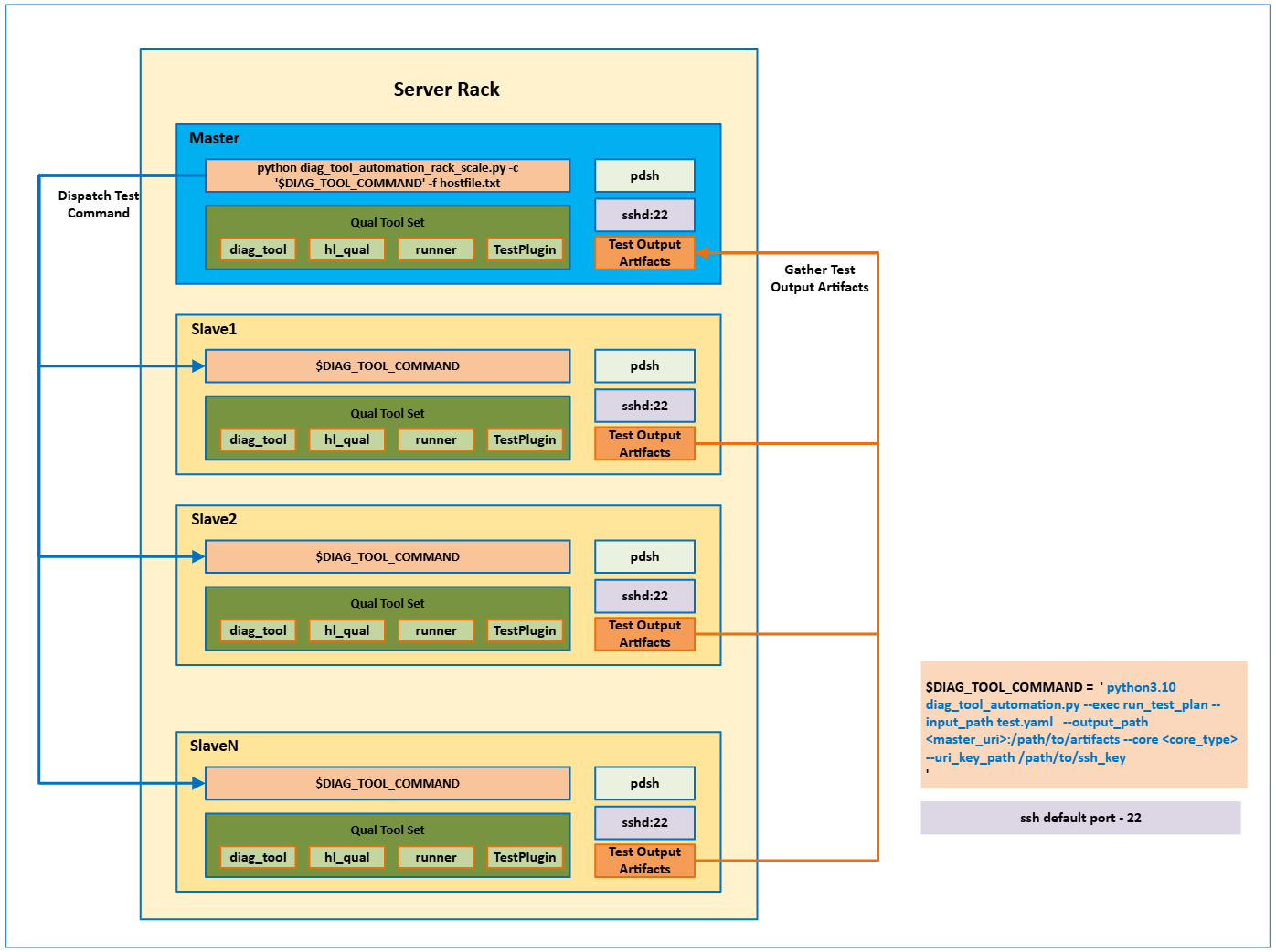
The Rack Scale script for Diagnostic tool is designed to execute the
diag_tool_automation.py test plan in parallel across multiple nodes
in a rack-scale environment when using hl_qual.
This tool parses node URIs from a host file and runs the remote Diagnostic tool test
command concurrently using pdsh with the ssh remote command module.
A custom SSH port can be specified to accommodate firewall configurations. The default is 22.
When the tests complete, all result artifacts can be collected from the nodes
to either the master node or a remote analyzer node using the
--output_path <remote_uri>:/path/to/result option in the Diagnostic tool.
Environment Setup
Set up the Diagnostic tool environment on all nodes in the cluster. For detailed setup instructions, refer to :ref:``Test_Plan_Automation` section.
Clone the source code:
git clone https://github.com/chaos/pdsh.git
cd pdsh
bootstrap
./configure --with-ssh
make && make install
Install
pdshon the master node:sudo apt install pdsh
sudo yum install pdsh
Set up SSH authentication. Use
automation/ssh_key_authentication.pyscript to establish SSH key-based authentication between the master node and all slave nodes in the cluster.Prepare a host file. The
hostfile.txtmust contain two sections:Master – at least one master node entry
Slave – one or more slave node entries
Example:
# hostfile.txt template
[Master]
user@master_ip

[Slave]
user@slave_ip1
...
user@slave_ipN
Run the SSH key authentication script on the master node:
python automation/ssh_key_authentication.py -f <path_to_hostfile> [-k <key_type>] [-p <port>]
Options
Option
Description
-f/--hostfilePath to the
hostfile.txt-k/--key_type(Optional) SSH key type:
dsa,ecdsa,ecdsa-sk,ed25519,ed25519-sk, orrsa(default:rsa)-p/--port(Optional) SSH port (default:
22)Note
When using a custom SSH port, make sure it is enabled in
/etc/ssh/sshd_config.Example Output:
2025-07-09 15:12:25,209 - INFO - Master: master_uri
2025-07-09 15:12:25,209 - INFO - Slaves: ['slave_uri']
2025-07-09 15:12:25,209 - INFO - Key Type: ed25519
2025-07-09 15:12:25,209 - INFO - ############### Start distribute ssh keys ###############
2025-07-09 15:12:25,359 - INFO - SSH key generated on master_uri
...
2025-07-09 15:12:26,245 - INFO - verify_ssh_connectivity done.
Options and Usage
The diag_tool_automation_rack_scale.py script can be found under /opt/habanalabs/qual/diag_tool/.
The following is a run command example:
python diag_tool_automation_rack_scale.py -c <diag_tool_command> [-f <path_to_hostfile>]
Options
Option |
Description |
|---|---|
|
Diagnostic tool test plan execution command. |
|
Path to the host file. The default is hostfile.txt. |
Note
For further help, run python diag_tool_automation_rack_scale.py -h.
Example
The following example demonstrates how to run the Diagnostic tool in a rack-scale development environment:
export PDSH_SSH_ARGS="-p <ssh_port>"  # (Optional) Set SSH port (default: 22)
export REMOTE_URI="remote_uri"
export DIAG_TOOL_COMMAND="python /opt/habanalabs/qual/diag_tool/diag_tool_automation.py \
  --exec run_test_plan \
  --input_path /opt/habanalabs/qual/diag_tool/test_plans/E2E.yaml \
  --output_path $REMOTE_URI:/var/log/habanalabs \
  --core gaudi2 \
  --uri_key_path ~/.ssh/id_ed25519"

cd <QUAL_SRC>/diag_tool
python diag_tool_automation_rack_scale.py -c "$DIAG_TOOL_COMMAND" -f hostfile.txt
For more information on generating and executing test plans, see Test Plan Automation section.